Understanding Kubernetes
Posted on: 10/08/2026(updated)
To understand Kubernetes, you must first understand the fundamental concept it builds upon: containerisation.
1. What is Containerisation?
A container is a lightweight, standardised unit of software that packages application code along with all its dependencies, configuration files, and runtime environment. This ensures that the application runs quickly, predictably, and reliably regardless of where it is hosted—whether on a developer's laptop, a test server, or a cloud provider.
Example: Containerising a Next.js Application
Imagine you're developing a Next.js application. To containerise it, you create a blueprint called a Dockerfile. This file instructs the Docker Engine on how to construct an image for your application.
Step 1: The Dockerfile (Blueprint)
# 1. Grab Node.js base image
FROM node:18-alpine

# 2. Create a working directory inside the container
WORKDIR /app

# 3. Copy source code (local dir -> container dir)
COPY . .

# 4. Install dependencies
RUN npm install

# 5. Build the Next.js production bundle
RUN npm run build

# 6. Command to run when the container starts
CMD ["npm", "start"]
Step 2: Building and Running the Container
Using the Docker CLI, you build the blueprint into a runnable Docker Image:
docker build -t sample-app .
Once built, anyone with access to this image can run it anywhere Docker is installed:
docker run -p 3000:3000 sample-app
Now every time this image runs, it spins up an identical container housing your running application, and it works everywhere.
The Limits of Standalone Containers
While Docker simplifies packaging applications, real-world production environments introduce complex operational challenges:
- Fault Tolerance: What happens if the container crashes in the middle of the night?
- Microservices Architecture: What if you need to separate your frontend (Next.js) from your backend API (Node.js/Go) into distinct containers and let them communicate securely?
- Dynamic Scaling: How do you quickly spin up five additional instances during holiday traffic spikes, evenly distribute incoming traffic behind a load balancer, and scale back down by three instances a week later?
- Zero-Downtime Updates: How do you deploy code updates without taking the application offline for users? Managing these tasks manually across dozens or hundreds of containers quickly becomes impossible.
Kubernetes Orchestration
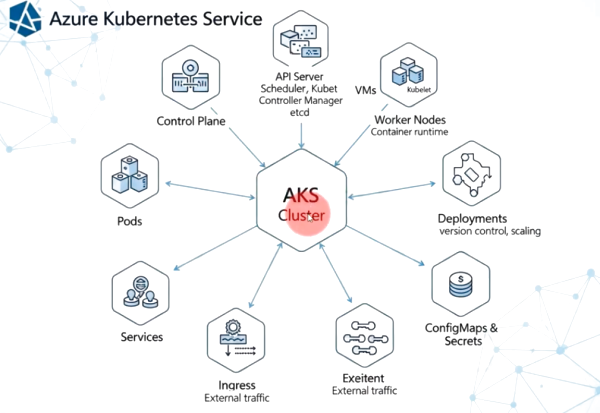
Kubernetes is an open-source container orchestration platform originally designed by Google. It automates the deployment, scaling, networking, and management of containerized applications.
Key Capabilities of Kubernetes
- Self-Healing: If a container crashes or stops responding, Kubernetes automatically restarts or replaces it. If a worker node dies, Kubernetes reschedules the containers on a healthy node.
- Automated Scaling: Kubernetes monitors traffic and resource usage, automatically scaling the number of running container instances up or down based on defined metrics.
- Load Balancing: Kubernetes distributes network traffic across multiple instances of your application to ensure stability and smooth performance.
- Declarative Configuration: Rather than manually managing containers, you write configuration files (YAML) stating your desired state (e.g., "I want 5 replicas of sample-app running at all times"), and Kubernetes continuously works to maintain that state.
Containerisation solves the problem of packaging code consistently across environments.
Kubernetes solves the problem of operating those containers at scale. By automating management, self-healing, and dynamic scaling, Kubernetes enables modern application teams to deliver resilient services with minimal operational overhead.